Check out this awesome picture frame: it’s an old french door that was cut in half, stripped, painted, distressed. Old windows can make for unique frames as well!
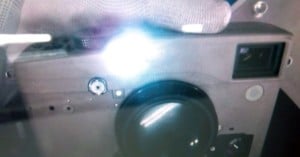
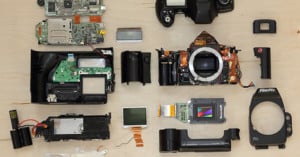
Wildlife photographer Markus Thompson was scuba diving in Deep Bay outside Vancouver recently when he stumbled upon a rusty Canon Rebel DSLR at the bottom of the ocean floor. After taking the SD card out and cleaning it, he was surprised to discover that it still worked, especially because the photos on it revealed that the camera was dropped back in August 2010. Thompson then turned to Google+ to find the owners, writing,
Approximately 50 pictures on the card from a family vacation. If you know a fire fighter from British Columbia whose team won the Pacific Regional Firefit competition, has a lovely wife and (now) 2 year old daughter – let me know. I would love to get them their vacation photos :)
After receiving thousands of comments and shares, he received an email from a friend of the owner, making this yet another crazy example of the Internet being used to reunite lost photos with their owners! You can see more photos of the DSLR here, in case you’re wondering what a year of seawater can do to a camera.
This video shows a social experiment in which disposable cameras were left unattended in various public locations with a simple message: “Take a Photo”. Hidden cameras were stationed nearby to observe how people responded to the cameras, and to provide some behind-the-scenes footage to how the various photographs were captured.
Did you know that Pablo Picasso was a light painter? His most famous light painting image shows him drawing a centaur in the air, but there are quite a few lesser-known photos showing the master dabbling in the art. LIFE writes,
Renowned LIFE photographer Gjon Mili, a technical genius and lighting innovator, visited Pablo Picasso in the South of France in 1949. Mili showed the artist some of his photographs of ice skaters with tiny lights affixed to their skates, jumping in the dark — and Picasso’s lively mind began to race. This series of photographs, since known as Picasso’s “light drawings,” were made with a small flashlight or “light pencil” in a dark room; the images vanished almost as soon as they were created.
Head on over to LIFE to check out a gallery of the light painting photos.
Here’s a Photoshop tutorial by Twin Cities Photography Group teaching how you can use Photoshop’s High Pass Filter to soften the skin on a portrait subject without losing the skin’s texture.
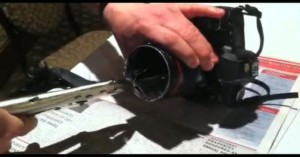
Canon’s 50mm f/1.8 Mark II is a terrific lens for its price, but its build quality definitely leaves something to be desired. Do a quick search, and you’ll find legions of broken-hearted Canonites who had their ‘Nifty Fifty’ split into two pieces after accidentally bumping or dropping it. Flickr user tastygiant is one such Canonite, but he subsequently discovered an awesome use for the broken lens:
Being a geek, I figured I could use the broken pieces in the future, so I shelved it and bought a new 50mm 1.8 Canon lens. One day, while taking shots around my apartment, I stumbled across the broken lens again and decided to reverse the “barrel assembly” onto the front of my intact 50mm. Everything was blurry of course, but I noticed if I got very close to an object the detail came into view. After adjusting the aperture to around f5.6, I had a clear image.


It’s important to note that you should switch to Manual focusing and rotate the focusing ring to “infinity”.
After seeing a video on YouTube of an Indonesian toddler who smokes 40 cigarettes a day, Belgian photographer Frieke Janssens decided to respond to a general smoking ban introduced in her country recently with a series of photos showing children smoking. I Love Belgium writes,
The children, aged four to nine, are shameless posing while enjoying their cigarette or cigarillo. So why kids? By portraying adults as children all the attention went to the smoking. An adult would draw to much attention to the portrayed person. Thus these portraits evoke question such as: is the smoking ban the right way to get rid of an absurd addiction and are smokers treated like little kids who can’t make the difference between good and bad? While Frieke doesn’t give answers, the portraits are strong enough to start your thinking process!
Although photographs have become quite controversial, it may comfort you to know that none of the children were exposed to actual cigarette smoke through the photo shoots — the cigarettes were actually made of cheese! Read the rest of this entry »
Did you know that you can use Photoshop’s Match Color feature to turn old paintings into “filters” for your images? James Delaney of Unfocused Brain explains,
Adjusting your photographs to get the color ‘just right’ can be a chore. Think about this: The Old Masters of painting spent years of their lives learning about color. Why let all their effort go to waste on the walls of some museum when it could be used to give you a hand with color correction?
Simply load both your photo and the painting (or whatever image you’d like) into Photoshop. Make sure your photos is the active window, and then go to Image->Adjustments->Match Color. Select the painting as your source, and tweak the sliders to suit your taste. Whenever you find a painting you like, keep them in a directory to slowly build up a collection of “filters”. You can also mimic the look of different films by using film photos as the source!